
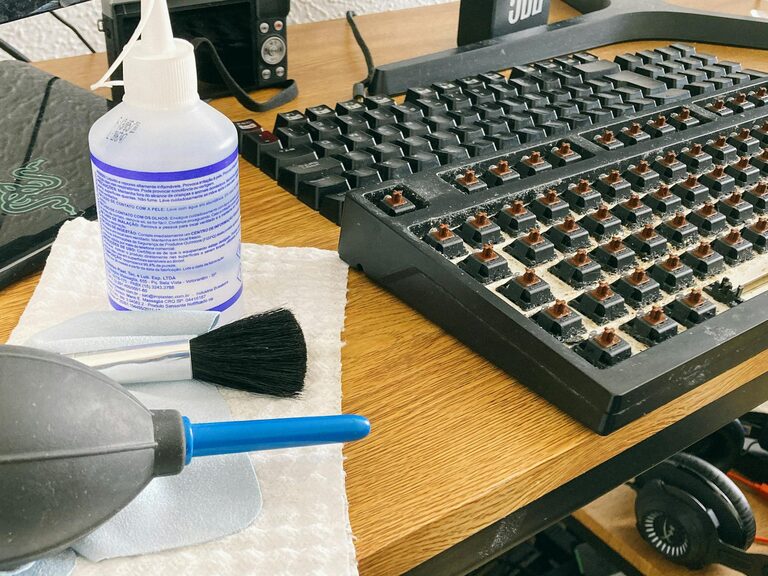
Keeping your phone and keyboard clean is essential not only for hygiene but also to ensure they work properly over time. However, cleaning these devices requires care since they are sensitive electronics that can be damaged by improper methods or harsh chemicals. In this guide, we’ll walk you through safe and effective ways to clean your phone and keyboard, including tips on what tools and products to use.
Why Clean Your Phone and Keyboard?
Our phones and keyboards are among the most frequently touched items we own. They can accumulate oils, dirt, dust, and germs, which can lead to unpleasant odors, sticky keys, and even spreading of bacteria or viruses. Regular cleaning helps:
– Improve device hygiene
– Maintain smooth keyboard function
– Prevent buildup of grime and dust
– Extend the lifespan of your devices
What You’ll Need
Before you start cleaning, gather the right supplies. Using the wrong materials can scratch surfaces or cause moisture damage.
Recommended Cleaning Tools and Materials
– Microfiber cloths (soft and lint-free)
– Isopropyl alcohol (70% or less) or alcohol-based wipes
– Distilled water
– Cotton swabs (Q-tips)
– Soft-bristle brush or compressed air for keyboards
– Small spray bottle
How to Clean Your Phone Safely
Modern smartphones have delicate surfaces and coatings, so cleaning must be gentle but thorough.
Step 1: Power Down the Device
To avoid accidental commands or damage, turn off your phone before cleaning.
Step 2: Remove Accessories
Take off any case, screen protector, or plugged-in accessories.
Step 3: Wipe the Exterior
Lightly dampen a microfiber cloth with a mixture of 50% distilled water and 50% isopropyl alcohol. Avoid spraying liquid directly onto your phone. Gently wipe the screen, back, and sides.
Tips:
– Avoid excessive moisture near ports and buttons.
– Don’t use household cleaners, bleach, or abrasive materials.
Step 4: Clean Charging Ports and Buttons
Use a dry cotton swab or a soft brush to remove dust or debris from ports and button areas, being careful not to push dirt further inside.
Step 5: Let It Dry and Reassemble
Allow your phone to air dry completely before turning it back on or putting accessories back.
How to Clean Your Keyboard Safely
Keyboards, especially those used frequently, can accumulate dust, crumbs, and germs. Cleaning helps keep the keys responsive and hygienic.
Step 1: Turn Off and Unplug
Ensure your keyboard is turned off or disconnected from your computer.
Step 2: Remove Loose Debris
Turn the keyboard upside down and gently shake or tap to dislodge particles. Use compressed air or a soft brush to get between the keys.
Step 3: Wipe the Surface
Dampen a microfiber cloth with a small amount of isopropyl alcohol or alcohol-based wipes and wipe the keys and keyboard surface. Avoid excess liquid.
Step 4: Detail Clean with Cotton Swabs
Use cotton swabs lightly moistened with alcohol to clean around and between keys.
Step 5: Deep Cleaning Option (Optional)
For mechanical keyboards or those with removable keys: carefully remove keys and clean underneath with a brush and cloth. Be sure to document key positions for reassembly.
Step 6: Dry and Reconnect
Let the keyboard dry fully before plugging it back in or powering on.
Additional Tips for Maintaining Clean Devices
– Regularly wipe your devices at least once a week.
– Wash your hands before using your phone and keyboard to reduce grime buildup.
– Avoid eating over your keyboard to prevent crumbs and spills.
– Use keyboard covers that are easy to clean.
– Store devices in clean environments when not in use.
What to Avoid When Cleaning Electronics
– Never immerse devices or parts in water.
– Avoid harsh chemicals like bleach, ammonia, or window cleaners.
– Don’t use abrasive cloths or paper towels that can scratch screens or keys.
– Avoid spraying liquids directly onto devices; always apply to cloth first.
Conclusion
Cleaning your phone and keyboard doesn’t have to be complicated or risky. With the right materials and techniques, you can keep your gadgets looking good and functioning well. Regular, gentle cleaning protects your health and investment by removing harmful germs and preventing damage from dirt and debris. Make it part of your routine for a cleaner, more enjoyable tech experience.
—
Feel free to share your favorite tips for keeping your devices clean in the comments below!